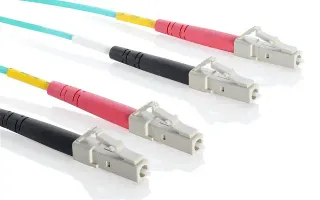
OM4 LC-LC: the standard for SR optics
This patch cable connects two LC duplex ports over OM4 multimode fiber (50/125 µm). It is the cable you need between SR optics, such as 10GBASE-SR and 25GBASE-SR, and for patch panels in the data center. LC/UPC at both ends, a 2 mm LSZH jacket and available in multiple lengths.
How far do you get over OM4?
OM4 is multimode fiber with more bandwidth than OM3. So the same optic reaches further:
- 10GBASE-SR: 400 m over OM4, 300 m over OM3.
- 25GBASE-SR: 100 m over OM4, 70 m over OM3.
- 40GBASE-SR4 and 100GBASE-SR4: 150 m and 100 m over OM4, but those use MPO, not LC.
Only use OM4 with multimode optics (SR, SX). An LR or LX optic belongs on single-mode fiber: for that there is the OS2 LC-LC patch cable.
LC duplex, UPC and LSZH
Duplex means two fibers in one cable: one to transmit, one to receive, as every regular optic uses. Both ends are LC/UPC, the common polish for data center optics. The LSZH jacket (low smoke, zero halogen) gives little smoke and no toxic halogens in a fire; in server rooms and offices that is often a requirement.
Choosing the length
Pick the length in the selector. Too long means coiling, and a coil in a cable tray takes space and a proper bend radius. Too short means strain on the connector. The patch cable length calculator works out your route and rounds up to a length we supply. Getting CRC errors on a link? Look at the patch first: a dirty or damaged connector is the most common cause.
Clean is half the job
On multimode you don't always see a dirty connector right away: the link comes up, but with a lower light level and occasional errors. Keep the dust caps on until you install the cable, and clean a connector that was used before plugging it into an optic. After installing, read the RX power via DOM: that tells you at once whether the link has the margin you expect.