SFP to RJ45 at 1G: when and how
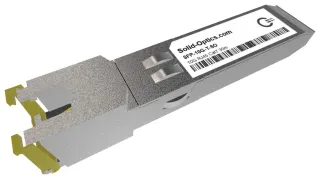
Does your switch or router have SFP ports and do you want to connect a copper 1G device, such as an access point, printer, camera or uplink to an older switch? This module turns the SFP port into RJ45, so you run 1000BASE-T over a regular network cable. Unlike 10G, at 1G that is hassle-free.
Reach and cable
This module reaches the full 100 m of 1000BASE-T over Cat5e. Cat6 or Cat6a works just as well. If your link runs longer, or between buildings or floors, pick an optic: glass doesn't care about distance or interference, and avoids ground loops between two buildings.
Power and heat
According to the datasheet the module typically draws 300 mA at 3.3 V, 350 mA max: around 1 W. That fits what every SFP port supplies, so you can fill a row of ports without cooling issues. The module is specified for 0 to 70 °C and has no DOM: copper doesn't let you read temperature and light levels. At 10G that is a different story: a 10GBASE-T module draws two to three times as much.
What to check
- Speed: this module does 1000BASE-T. A device that only talks 10 or 100 Mbit/s works only if module and switch port support it. Check the datasheet if you need that.
- SFP+ port: most SFP+ ports accept a 1G SFP, but not all. Check your switch manual to see if the port does 1G.
- Coding: pick your switch's vendor under Coding and we code the module before shipping, at no extra cost.
Need 10G over copper? There is the 10G SFP+ RJ45 module. Not sure what your switch accepts? Ask us.
Why an RJ45 SFP rather than a media converter?
A separate media converter needs its own power supply and an extra cable, and is one more device that can fail. An RJ45 SFP sits in the switch itself, takes power from the port and shows up in your switch's interface list, so you monitor the link as usual. If you have no free SFP port, or want to convert copper to fiber at a remote spot, a media converter is the right choice.