Data center cable labeling: a scheme that stays correct
A TIA-606 labeling scheme for rack, patch panel, port and patch cable: what goes on the label, what goes in NetBox, and how remote hands find the right cable.
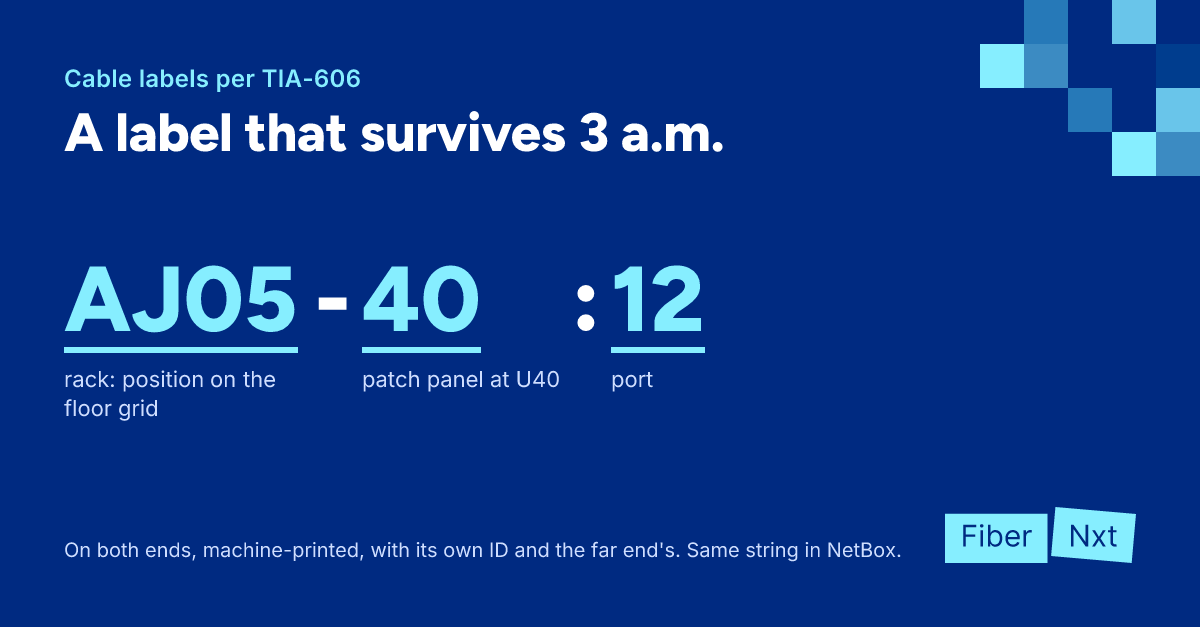
It's 3 a.m., a link is down, and the remote hands engineer is staring at a rack with two hundred yellow patch cables. Half have no label; the rest say "SW1" in marker. Nobody knows which cable goes to which port. This article gives you a labeling scheme that survives that night: how to build identifiers the TIA-606 way, which label types to use, what belongs on the label and what belongs in your documentation, plus a checklist for your next migration.
What TIA-606 asks of you
The standard is ANSI/TIA-606, now at revision D, published in October 2021. The international counterpart is ISO/IEC 14763-2, with its identifiers worked out in ISO/IEC TR 14763-2-1. The idea is the same: every component gets a unique identifier with a record in your documentation.
In a data center that comes down to four levels:
- Space — floor number plus a letter per room, for example
2A. - Rack — its position on the floor grid, for example
AJ05. No grid? Number the row and the position within the row. - Patch panel — the rack unit the panel sits in:
AJ05-40is the panel at U40, counted from the bottom. - Port — the port number after a colon:
AJ05-40:12.
Three rules from the standard keep this practical. Cables are labeled at both ends. Labels are machine-printed, not marker. And a label doesn't need the full identifier, only enough to tell the component apart within its space. On the port itself, 12 is enough, because whoever stands there can already see the panel.
A scheme that names the far end
An identifier only earns its keep when it names the far end. TIA-606 already writes a link that way: AG09-35:01/AJ06-35:01, near end first, then far end. Read one end and you know where the other is. The standard also asks for the far-end panel identifier on the patch panel, if practical, so the far end goes on the cable and the panel, not on every port.
If you run more than one site, add a site code in front. A practical example:
AMS1-2A-AJ05-40:12 ↔ AMS1-2A-AK07-38:12
Site, room, rack, panel U position, port, then the far end. The site code is our addition; check TIA-606 for the exact site notation. More important than punctuation: pick one scheme, write it down and stick to it.
On the patch cable itself, put the local port ID and the far-end ID on each end. Pull it at the switch and you see at once which patch panel it goes back to.
Which label on which cable
- Wrap-around (self-laminating) — a printed area plus a clear tail that wraps over the text and protects it. The default for patch cables.
- Flag — sticks out from the cable and reads from both sides. Ideal in a full patch panel where you can't move the bundle.
- Heat-shrink — a sleeve you slide over the cable and shrink. Very durable and can't slide off, but has to go on before the connector does. That usually rules it out for factory-terminated patch cables.
Pick a font you can read by flashlight from a meter away, and place the label near the connector.
On the label or in the documentation
A label tells you where a cable is. Your documentation tells you why. Speed, VLAN, owner, ticket number and test results change, and nobody prints a new label for that. They belong in your DCIM. In NetBox, a cable has an A and a B termination, a label field, type, color and length, and you can trace the path from either end. Use exactly the same string in that label field as on the cable.
Color helps, but it isn't an identifier. The jacket color tells you the fiber type, not the function. TIA-606 recommends colors for termination fields (orange for the demarcation point, green for network connections) but doesn't require them. Use color as a hint, never as the only marking.
For a cross-connectCross-connect Physical link in a data centre between your rack and another party's, usually via the meet-me room and provided by the data centre itself. through the meet-me-room, put the data center's circuit ID on your label. That's the number their support desk will ask for.
Introducing or cleaning up a labeling scheme
- Write the scheme on one page: levels, notation, examples.
- Record every rack and patch panel in your DCIM before you print a single label.
- Print labels from the documentation, not the other way round, so the two stay in sync.
- Label every patch cable at both ends with its own ID and the far end.
- Measure and order cables per connection, so there are no loops to hide.
- Give remote hands the rack, U, panel, port and far-end ID, plus a photo.
- Ask for a photo after every job and update the documentation straight away.
With the right length, no tangle hides your labels. How to measure is in standard patch cable lengths, and the patch cable length calculator works it out per connection.
What to do now
Take the rack you trust least and check five random cables against NetBox. Two misses, and you know where to start. Order new patch cables to length, or let us help: a quickscan of your cabling and labeling, a labeling scheme with patch plan, or team training. See our services.
Founder of FiberNxt and Xyphen IT
Yvan Watchman is the founder of FiberNxt and Xyphen IT. He has been building and running networks and data centre infrastructure in and around Amsterdam for years.
Related products and services
Frequently asked questions
Which standard do you use for data center cable labels?
ANSI/TIA-606, currently revision D from 2021. It gives every component a unique identifier: space, rack, patch panel, port and cable. The international counterpart is ISO/IEC 14763-2, with the identifiers in ISO/IEC TR 14763-2-1. Which one you pick matters less than applying it consistently.
Should a patch cable be labeled at both ends?
Yes. TIA-606 requires labels at both ends. Put the local port ID and the far-end ID on each end, so whichever end you're standing at, you know where the cable goes.
What goes on the label and what goes in NetBox?
On the label, only what someone in front of the rack needs: the local ID, the far-end ID and, for a cross-connect, the circuit ID. Speed, VLAN, owner and test results change, so they belong in your documentation, such as the cable's description, tags or custom fields in NetBox. The NetBox label field holds the same string as the physical label.