100G DAC cable: short, low-power and fast
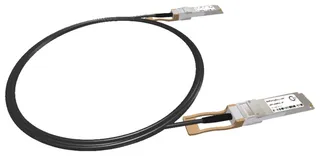
This passive DAC cable connects two QSFP28 ports at 100G (100GBASE-CR4) without optics or patch cables. It uses four lanes of 25 Gb/s in each direction. For spine-leaf within the rack, switch to server or stacking two switches, it is the lowest-power and cheapest 100G link.
Length: 0.5 to 5 m
IEEE 802.3bj targets 5 m for passive 100G DAC. We supply 0.5, 1, 2 and 5 m. The longer the cable, the thicker the wire: a 100G DAC is stiff, with a bend radius of around ten times its diameter. Keep that in mind in a full rack and don't pick it longer than needed. The patch cable length calculator helps you pick the right length.
FEC and compatibility
At 100G over copper, RS-FEC should be on at both ends; without FEC you see errors on longer cables or the link doesn't come up. Most switches do this automatically for a DAC, but check it if a link stays down.
A DAC identifies itself to the switch with a vendor ID, just like a transceiver. Pick your equipment's vendor under Coding. Connecting two vendors, for example a switch to a NIC from another brand? Contact customer service and we'll work out which coding works at both ends.
When not to
- Longer than 5 m, or to another rack: pick an AOC or two QSFP28 optics with a patch cable.
- To four 25G ports: you need a breakout cable, QSFP28 to 4× SFP28. We supply breakouts on request.
Breakout and port settings
Plugged in the DAC and the link stays down? Check that both ports are set to 100G, not to breakout (4× 25G) or 40G. Some switches remember the port mode from a previous cable. Also check that both ends use the same FEC mode. After that, reseat the cable at both ends: a half-inserted QSFP28 gives exactly the same symptoms as a broken cable.