Testing optics before a rollout: catch the duds before your maintenance window
Rolling out dozens or hundreds of optics? How to test coding, recognition, DOM, link and errors up front, how long to soak them and what to record per port.
A new site goes live in three weeks, or you're swapping every uplink in a single night. There are eighty optics on your desk and a four-hour maintenance window. The last thing you want is to find out at 2 a.m. that half of them carry the wrong coding, or that one module keeps flapping. This article covers what to test beforehand, where to do it, how long to let modules run and what to record per port, with a printable checklist at the end.
Start with a paper check
Before anything goes into a switch, check the delivery against your plan. For each platform you want the right part number, reach and wavelength, and the right codingCodierung Die Herstellerkennung im EEPROM eines Transceivers. Viele Switches akzeptieren nur Optiken, die für die eigene Marke codiert sind.. The switch reads the vendor name, part number and serial number from the transceiverTransceiver Steckbares Modul, das elektrische Signale eines Switches oder einer NIC in Licht (oder Kupfer) umwandelt und zurück. Sender und Empfänger in einem Gehäuse, zum Beispiel ein SFP+ oder QSFP28.'s EEPROM and uses them to decide whether to accept it. A box with the wrong coding takes ten minutes to spot today; in the maintenance window it costs you the night. More in third-party optics and coding.
Check the target platform's software version too: Cisco's compatibility matrices list a minimum software release per platform, and whether DOM is supported.
Lab or on site
- Lab — a test switch of the same model, running the same software. Controlled, but not the real path.
- On site — the optics already in the target switches, before cutover, on the real fiber. That tests the platform and the cabling in one go, but the switches have to be installed already.
Our advice: test every combination of type, coding and platform in the lab, and do the rest on site once the switches are in.
What to test per module
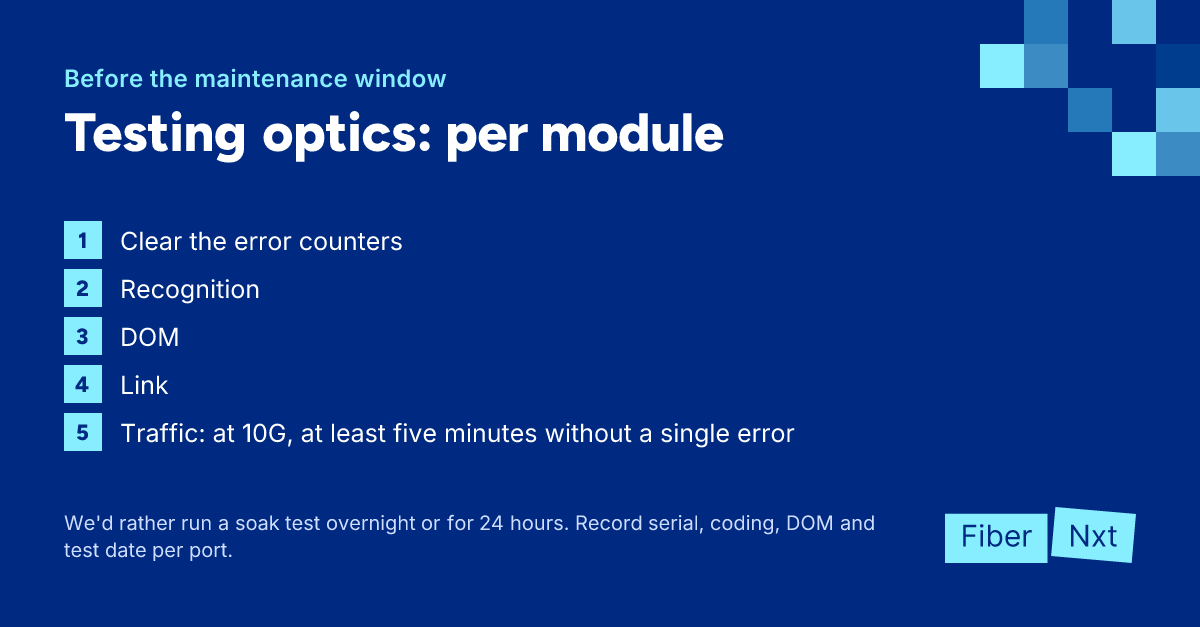
- Recognition — insert it and confirm the switch accepts it without an unsupported-transceiver message.
show inventory(Cisco) orshow chassis hardware(Juniper) lists the type and serial number per port. - DOM — read temperature, voltage, bias, Tx and Rx. You're not after exact values (SFF-8472 allows ±3 dB on Tx and Rx), but outliers within the batch, like a module running much hotter than the rest. See reading DOM/DDM.
- Link and traffic — build a loop or a test link between two ports and push traffic. Mind the power budget: a 10G LR can't overload itself on a short loop, an ER can. Cisco specifies a 5 dB attenuatorDämpfungsglied Passives Bauteil, das eine feste Lichtmenge in dB wegnimmt, zum Beispiel 5 dB. Sie setzen es vor den Rx-Port, wenn eine Long-Reach-Optik auf einer kurzen Strecke den Empfänger übersteuert. for an ER below 20 km.
- Error counters — clear them before you start and check CRC errors afterwards, and FEC errors where FEC is enabled (typically 25G and up).
- BiDi — you can't test a BiDi module on a loop by itself: it transmits and receives on different wavelengths. Test U and D as a pair; see BiDi pairs explained.
- Connectors — inspect and clean every patch cord and loop, even one fresh out of the bag. A dirty test cable makes a good optic look bad. See cleaning fiber connectors.
How long, and what to record
The objective for 10GBASE-R is a BER of 10^-12. To say with 95% confidence that you're below it, you need to see 3 × 10^12 bits without a single error. At 10G with line-rate traffic that's about five minutes, and that's the floor per link.
We prefer a soak test overnight or for 24 hours. That covers a temperature cycle and actually catches a link that flaps every so often. Then check errors, flaps and DOM stability.
Record per port: serial number, type, coding, DOM values at test time and the date. That's your baseline to measure later degradation against. And bring spares into the window: at least one tested module per type and coding, plus patch cords.
The checklist
- Compare the delivery with your plan: part number, reach, wavelength and coding per platform.
- Check that the software version on your target platform supports the optics and DOM.
- Inspect and clean every patch cord and loop you use for testing.
- Insert each module in a switch of the target platform and check that it's recognized.
- Read DOM and look for outliers within the batch.
- Test link and traffic on a loop or test link, with an attenuator where the power budget calls for one.
- Test BiDi modules as a U/D pair.
- Clear the error counters and run each link for at least five minutes, preferably overnight.
- Record serial number, coding, DOM values and test date per port.
- Set aside a tested spare per type and coding for the maintenance window.
Or let us test first
Our optics come from Solid Optics, a Dutch company. They test locally, per batch and per item, including on customer equipment. In doubt? Then we'll test on your equipment first. Our RMA rate stands at 0.7%, and that includes wrong choices, degradation and checks. We've never had a DOA.
To keep watching that baseline after the rollout, we're building Praevisio, currently in beta with a waitlist. It tracks each module's DOM values against its own baseline, together with CRC and FEC errors and flapping links. Your data stays in the Netherlands.
Order optics with your platform's coding, clean with a Clear Connection Tool, and have links measured after the rollout with our Optics & link test via services. Planning a big rollout? Call an engineer.
Gründer von FiberNxt und Xyphen IT
Yvan Watchman ist Gründer von FiberNxt und Xyphen IT. Er baut und betreibt seit Jahren Netzwerke und Rechenzentrumsinfrastruktur in und um Amsterdam.
Passende Produkte und Dienstleistungen
Häufig gestellte Fragen
How long should a soak test run?
At least long enough to say something meaningful. At 10G with line-rate traffic, roughly five minutes without a single error gives you 95% confidence that the BER is below 10^-12. We prefer to run overnight or for 24 hours: that covers a temperature cycle and actually catches a link that flaps now and then.
Can I test a BiDi module on a loop?
Not on its own. A BiDi module transmits and receives on different wavelengths, so looping it back to itself gives no link. Test a U and a D module together, between two ports.
Can you test optics on my equipment first?
Yes. Our optics come from Solid Optics, a Dutch company that tests locally, including on customer equipment. Tell us your platform and software version and we'll agree on how to test before you roll out the whole batch.